Claude Code Memory System — Usage Guide
Let Claude Code remember who you are, what you prefer, and what's happening in your project across sessions.
Memory System · Four Memory Types · Trigger Saving · Storage Location · Manage Memories · Lifecycle · Quick Reference
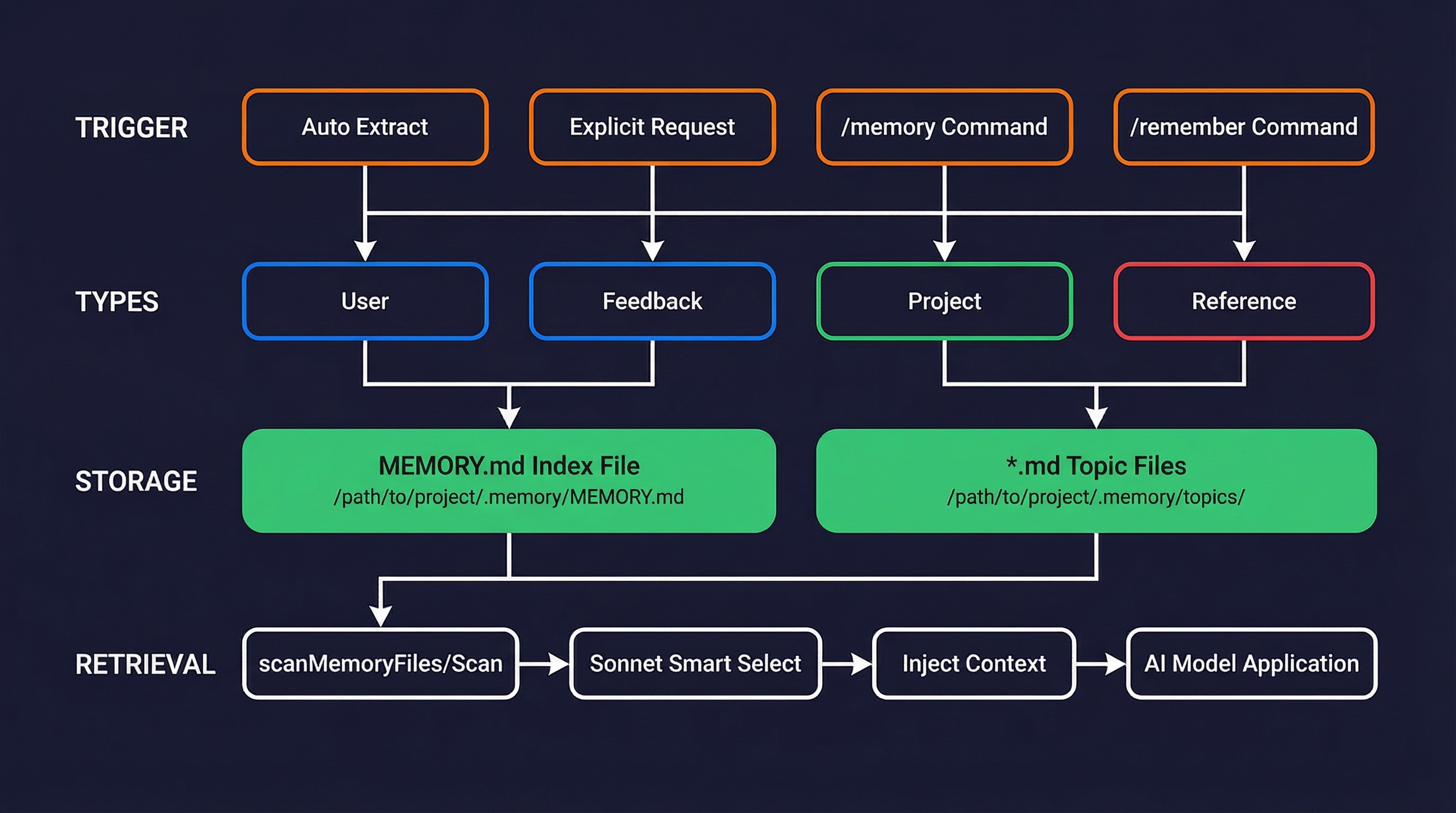
1. What Is the Memory System?
Claude Code's memory system is a file-based persistent knowledge store that allows Claude to continuously build understanding of you and your project across multiple conversations.
Core principle: Only remember things that cannot be inferred from the code itself.
| Remembered | Not Remembered |
|---|---|
| You're a data scientist focused on logging systems | Code architecture, file structure |
| "Don't mock the database" | Git history, who changed what |
| Non-critical merges frozen after Thursday | Existing CLAUDE.md content |
| Bug tracking is in Linear's INGEST project | Debugging solutions (fixes are already in the code) |
2. Four Memory Types
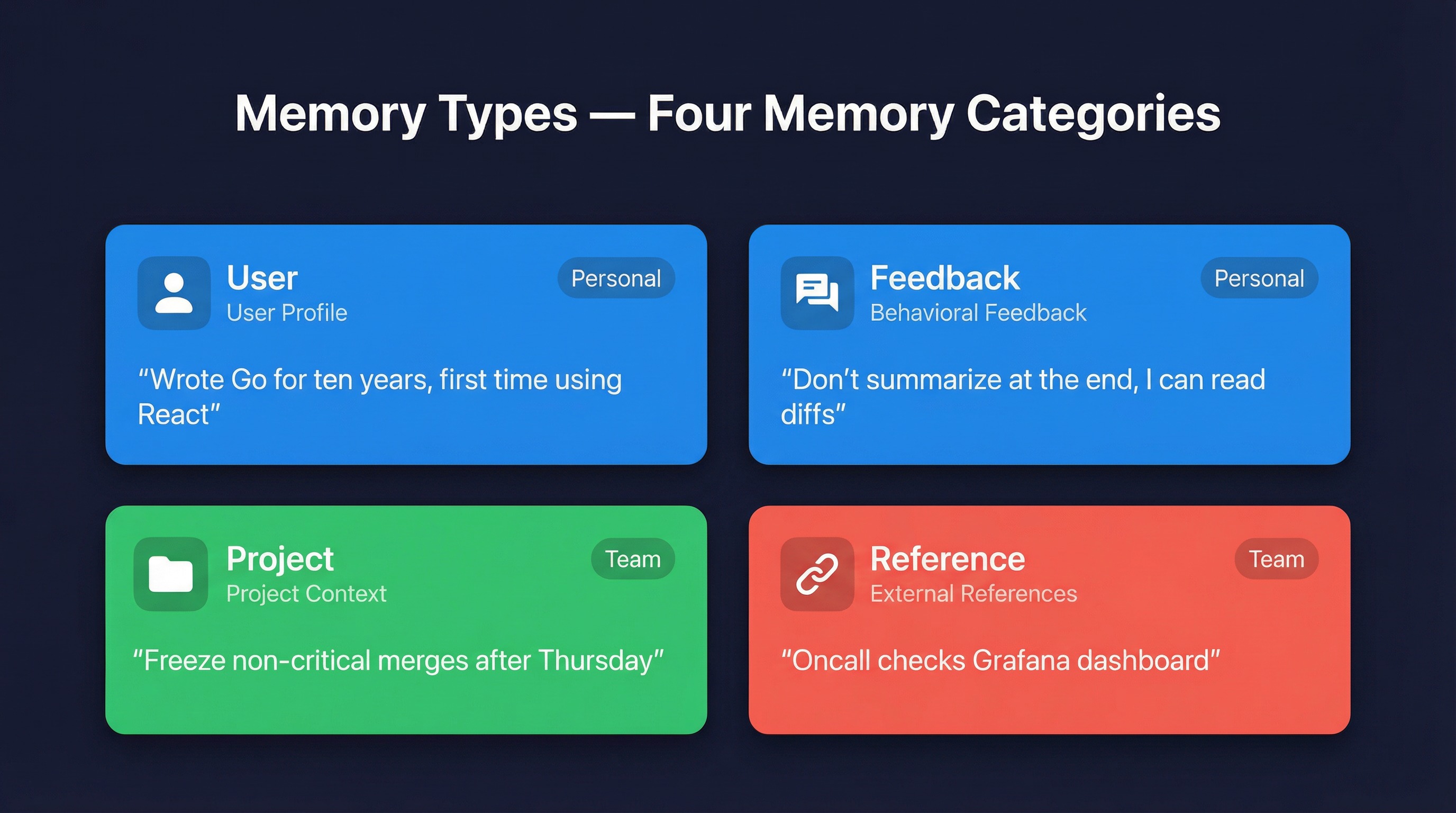
Claude Code strictly categorizes memories into four types:
2.1 User (User Profile)
Records your role, goals, skill level, and preferences to help Claude tailor its collaboration approach.
User says: I've written Go for ten years, but this is my first time touching the React part of this repo
Claude saves: Deep Go experience, React newcomer — explain frontend concepts using backend analogies
2.2 Feedback (Behavioral Feedback)
Your corrections or affirmations about how Claude works. These memories prevent Claude from repeating the same mistakes.
User says: Don't summarize what you did at the end of your reply, I can see the diff
Claude saves: User prefers concise replies, no trailing summariesImportant: Not only corrections are recorded -- affirmations are too. If Claude makes a non-obvious choice and you approve, that gets remembered as well.
2.3 Project (Project Context)
Project context that cannot be derived from the code or Git history: who's doing what, why, and deadlines.
User says: We're freezing all non-critical merges after Thursday, the mobile team needs to cut a release branch
Claude saves: Merge freeze starting 2026-03-05, flag non-critical PR work after this dateNote: Claude converts relative dates ("Thursday") to absolute dates ("2026-03-05") to ensure memories don't become ambiguous over time.
2.4 Reference (External References)
Pointers to information in external systems: dashboards, issue trackers, Slack channels.
User says: On-call monitors the grafana.internal/d/api-latency dashboard
Claude saves: grafana.internal/d/api-latency is the on-call latency dashboard — check when editing request path code
3. How to Trigger Memory Saving
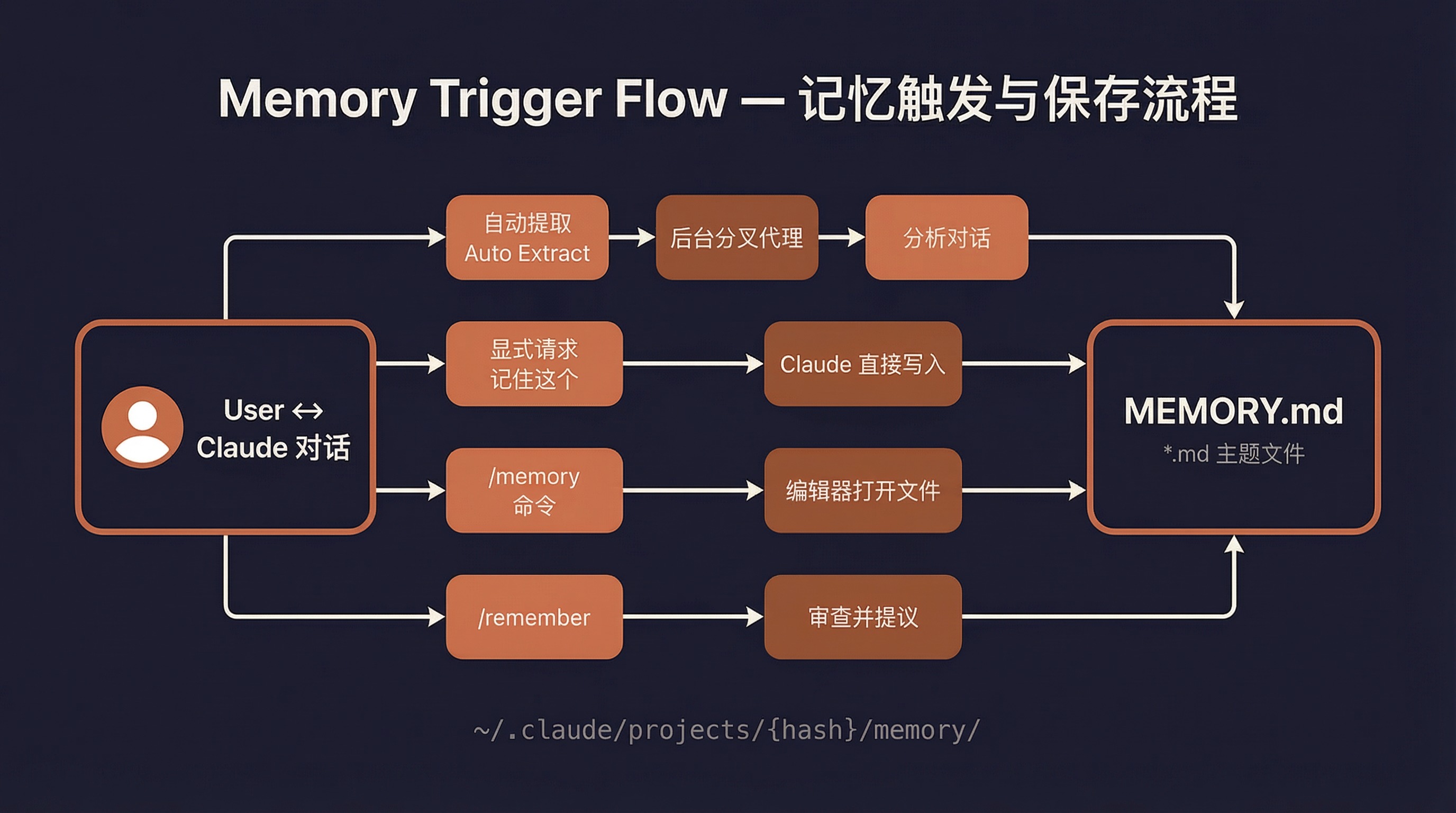
Method 1: Automatic Extraction (Most Common)
This is the primary method. You don't need to do anything -- Claude automatically analyzes conversation content at the end of each conversation turn and extracts information worth remembering.
Workflow:
- You have a normal conversation with Claude
- Claude finishes its response (no tool calls pending)
- A memory extraction sub-agent starts in the background
- The sub-agent analyzes the recent conversation content
- It identifies memories worth saving
- Writes memory files + updates the MEMORY.md index
The terminal will display a notification:
Memory updated in ~/.claude/projects/.../memory/feedback_testing.md · /memory to editMethod 2: Explicit Request
Directly tell Claude to "remember this":
User: Remember, this project must run bun test before deploying
Claude: [Immediately saves as a feedback-type memory]
Method 3: /memory Command
Type /memory in the terminal to open a file picker that lets you edit memory files directly in your editor.
> /memoryThis lists all editable memory files (CLAUDE.md, CLAUDE.local.md, auto-memory, etc.) and opens the selected file with your $EDITOR or $VISUAL.
Method 4: /remember Command
Type /remember to trigger the memory review skill, which will:
- Review all automatic memory entries
- Propose promoting suitable entries to CLAUDE.md or CLAUDE.local.md
- Detect duplicate, outdated, and conflicting memories
- Does not modify anything directly -- all changes require your approval
4. Where Are Memories Stored?
Directory Structure
~/.claude/
└── projects/
    └── {project-path-hash}/
        └── memory/                    <- Auto-memory directory
            ├── MEMORY.md              <- Index file (always loaded into context)
            ├── user_role.md           <- User profile memory
            ├── feedback_testing.md    <- Behavioral feedback memory
            ├── project_freeze.md      <- Project context memory
            ├── reference_linear.md    <- External reference memory
            └── team/                  <- Team shared memory (if enabled)
                ├── MEMORY.md
                └── ...
Memory File Format
Each memory file uses YAML frontmatter + Markdown content:
---
name: Testing strategy preference
description: Integration tests must use a real database, no mocking
type: feedback
---

Integration tests must use a real database, no mocking.

**Why:** Last quarter, mocked tests passed but production migrations failed — mock/production divergence masked the issues.

**How to apply:** When writing or reviewing tests, ensure database operations use real connections.
MEMORY.md Index File
MEMORY.md is an index, not content. It is always loaded into context, with one entry per line:
- [User role](user_role.md) — Data scientist, focused on observability/logging
- [Testing strategy](feedback_testing.md) — Integration tests use real DB, no mocking
- [Merge freeze](project_freeze.md) — Non-critical merges frozen starting 2026-03-05
- [Bug tracking](reference_linear.md) — Pipeline bugs tracked in Linear INGEST projectLimit: Maximum 200 lines or 25KB; content beyond this is truncated.
5. How to Manage Memories
Ask Claude to Forget
User: Forget the memory about the merge freeze
Claude: [Finds and deletes the relevant memory file and index entry]
Ask Claude to Ignore Memories
User: Ignore memories, start from scratch
Claude: [Does not use any memory content in this conversation]
Manual Editing
Directly edit files under ~/.claude/projects/{hash}/memory/, or use the /memory command.
Disable Automatic Memory
| Method | How |
|---|---|
| Environment variable | CLAUDE_CODE_DISABLE_AUTO_MEMORY=1 |
| Settings file | Set "autoMemoryEnabled": false in settings.json |
| Bare mode | Start with --bare / CLAUDE_CODE_SIMPLE=1 |
Custom Memory Directory
Set in ~/.claude/settings.json:
{
  "autoMemoryDirectory": "~/my-claude-memories"
}
Supports ~/ expansion. For security reasons, the project-level .claude/settings.json is not allowed to set this option.
6. Memory Lifecycle
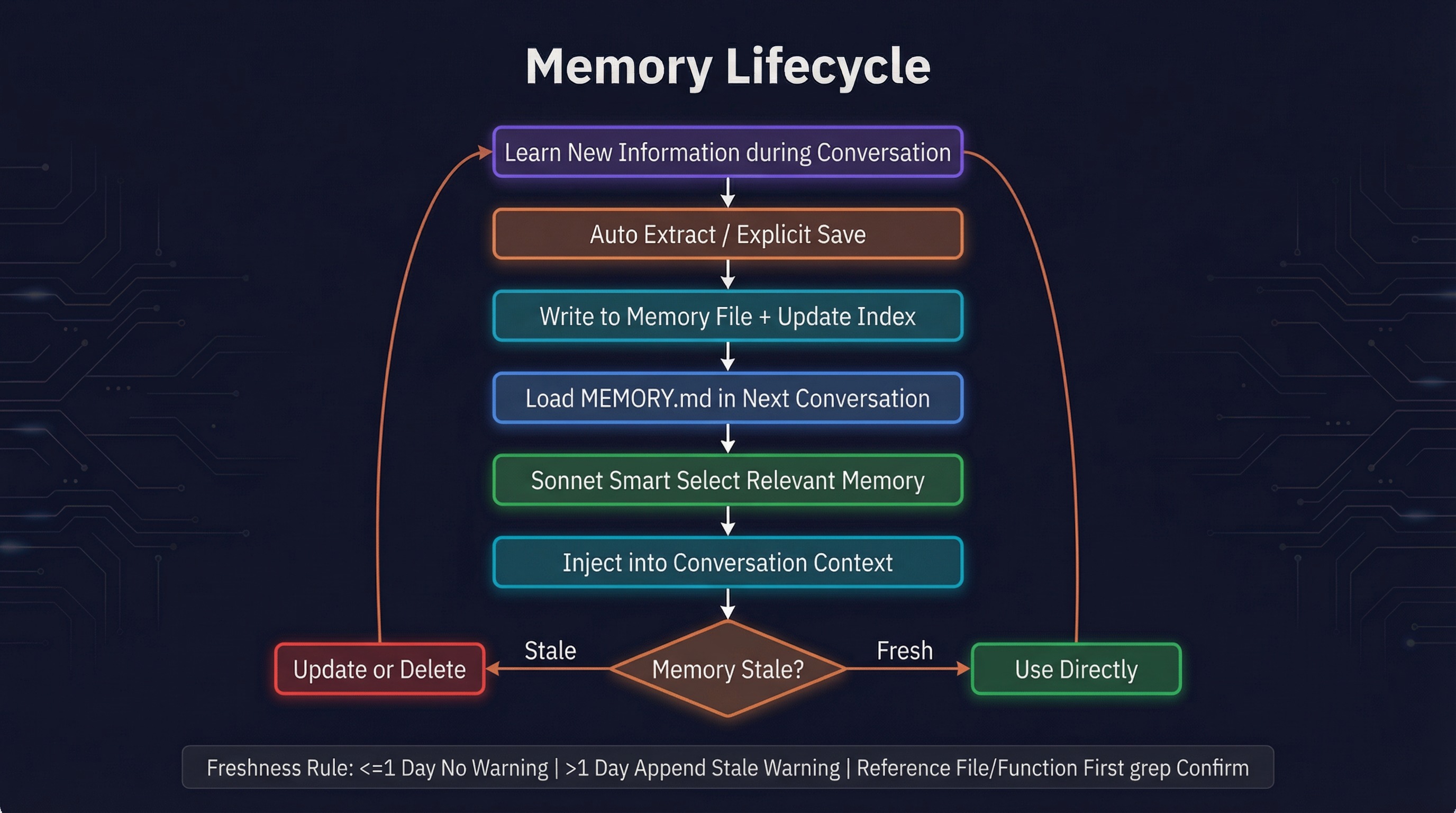
New information learned during conversation
      |
 Auto-extraction / Explicit save
      |
  Write memory file + index
      |
 Next conversation loads MEMORY.md
      |
  Intelligent selection of relevant memories (Sonnet)
      |
   Inject into conversation context
      |
  Memory getting old? Verify before using
      |
  Outdated? Update or delete
      |
 (After 24h + 5 sessions)
      |
  AutoDream consolidates memories in background
AutoDream -- "Dreaming" to Organize Memories
Claude Code has a hidden AutoDream feature, analogous to how the human brain organizes memories during sleep. When the following conditions are met, Claude silently launches a "dreaming" sub-agent in the background:
- At least >= 24 hours since the last consolidation
- At least >= 5 sessions accumulated in the interim
The dreaming process has four phases: Orient -> Gather -> Consolidate -> Prune. The bottom status bar shows "dreaming", and you can press Shift+Down to view progress or x to terminate.
For a detailed technical analysis, see AutoDream Memory Consolidation.
Freshness Management
- Today's/yesterday's memories: Used directly
- Memories older than 1 day: Accompanied by a stale warning, reminding Claude to verify before citing
- Memories referencing file paths/function names: Confirmed via grep before use to ensure they still exist
7. Quick Reference
| Action | Method |
|---|---|
| Ask Claude to remember | "Remember: this project uses bun, not npm" |
| Ask Claude to forget | "Forget the memory about XXX" |
| Edit memories | /memory command |
| Review and organize | /remember command |
| Ignore memories | "Ignore memories" / "Don't use memories" |
| Disable auto-memory | CLAUDE_CODE_DISABLE_AUTO_MEMORY=1 |
| Disable AutoDream | Set "autoDreamEnabled": false in settings.json |
| Manually consolidate memories | /dream command |
| View memory directory | ~/.claude/projects/{hash}/memory/ |